To figure out at what point 16GB causes problems, I spent time working with a modern gaming PC with 16GB of memory running games, internet browsers, Discord, and other applications running in the background. For a long time, 16GB of RAM has been the norm for gaming PCs, but we are now in 2026, and that simply doesn’t hold true anymore.
Games have gotten bigger, the internet browser takes up even more GB of memory, and it’s not unusual for one to run Discord, games launching apps, recording apps, and other software at the same time anymore. So, I wanted to answer a simple question: Is 16GB RAM actually becoming too little, or is 32GB becoming more convenient?
The Test System
For this experiment, I used my own personal gaming PC, rather than a specifically configured benchmark PC.
| Component | Specification |
|---|---|
| CPU | Ryzen 5 5500 |
| GPU | RTX 2070 8GB |
| RAM | 16GB DDR4-3200 |
| Motherboard | Gigabyte B450M DS3H |
| OS | Windows 11 |
| Resolution | 1080p |
The goal here is not to achieve the highest possible FPS, instead I wanted to see what actually happens to the entire PC when the whole 16GB RAM is getting used up.
Test 1: Windows With Nothing Running
Just after I booted up my PC, I recorded the RAM which is being used and how much I have available for now:
- RAM Usage: 3.2GB
- Available RAM: 12.6GB
(The recorded used and available RAM after PC boots up into Windows)
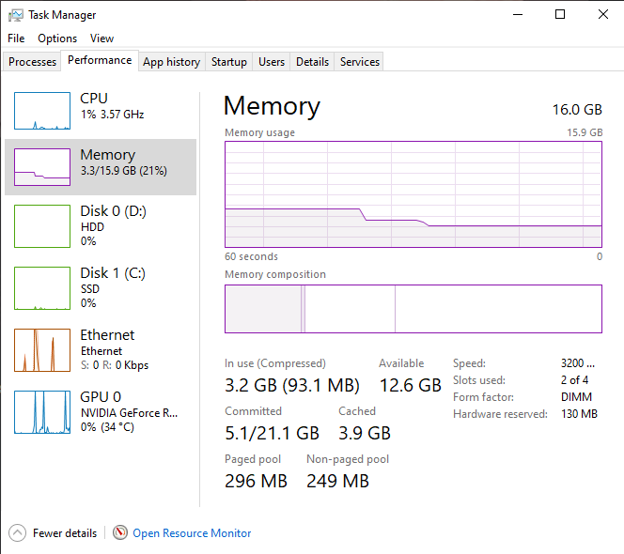
Windows does not always leave your RAM empty. Background processes and cached data can use memory, and several gigs being used does not imply that anything is wrong.
Test 2: Gaming With 16GB
Next, I launched Resident Evil 9 (Requiem) and played for almost half an hour. I recorded:
- Average FPS: 110
- 1% Lows: 98
- RAM Usage: 68% (4.5GB used by game and remaining used by background processes) 8.7GB being used and 6GB available.
- VRAM Usage: 7GB
- CPU Usage: 55%
- GPU Usage: 97-98%
Results:
- Average FPS: 110
- 1% Lows: 98
- RAM Usage: 68% (8.7GB being used and 6GB available)
At this point of the scenario the question wasn’t that the game ran, it was whether Windows still had enough RAM available to comfortably handle everything else.

Test 3: Gaming + Discord + Chrome
This is where things become more representative of how people actually use their PCs. Before launching the game, I opened:
- Discord
- Opera GX
- Browser tabs
- Steam
- Spotify
I then launched the same game using exactly the same graphics settings. The RAM usage increased from 8.7 GB to 12 GB. I expected the additional applications to have some effect on performance, but the results were surprisingly consistent.
But did gaming performance change?
| Metric | Gaming Only | Gaming + Apps |
|---|---|---|
| Average FPS | 110 | 109 |
| 1% Low | 98 | 97 |
| RAM Usage | 8.7 GB | 12 GB |
| SSD Usage | 60-70% | 70% |
The low results at the first percentile of measurements did not fluctuate much, while average performance also remained stable. Even with a lot of memory consumed by applications run in the background, performance was not severely impacted in this particular test. This shows that having 16GB of system memory should not automatically be regarded as a disadvantage when running background applications.
Test 4: What Happens When 16GB Gets Full?
Now, I pushed the system to its limits. I launched Marvel Rivals which is an Unreal Engine 5 game and quite a heavy on hardware game. Marvel Rivals can take about 4GB to almost 8GB of RAM. And if a browser, multiple tabs, Discord, Spotify and Steam are opened in the background, it can put the PC in a choke hold.
Right now, Windows is gradually adopting a more aggressive approach to memory management. When physical RAM is low, Windows has the ability to utilize the page file on the storage disk. The SSD is not a substitute for the RAM itself.
That means memory pressure can potentially result in:
- Stuttering
- Longer application switching
- Asset-loading pauses
- Increased disk activity
- Worse frame times
- Slower multitasking
The FPS Number Doesn't Tell the Whole Story
The most important part of this experiment. Suppose we get:
With 16GB RAM:
- Average FPS: 105
- 1% Lows: 75
And with 32GB RAM:
- Average FPS: 107
- 1% Lows: 99
Someone looking only at average FPS might conclude: 32GB barely makes a difference. But that’s not the case here, its not always about the average FPS you get, its also about the frame time spikes and if the frame time graph is in a smooth line that means the best-case scenario. 16GB and 32GB RAMs showed that, a lot of FPS doesn’t necessarily prove the game is smooth, many factors are indulged in it. This is why I'm also looking at 1% lows and frame-time graphs, rather than just average FPS.
Does 32GB Actually Increase FPS?
It's not always true. This is how the talk about RAM often gets misleading. Going from 16GB to 32GB does not necessarily mean something. If your game runs well on 16GB of RAM, having another 16GB may not make much difference in FPS. Performance improves when 16GB is not enough. In such a case, adding more RAM gives your OS and programs more space to perform.
What About Modern Games?
This is where I'd test several different types of games rather than just one.
Competitive games:
- Apex Legends: Low to mid RAM usage
- Marvel Rivals: High RAM usage (depends on each map in-game)
- Valorant: low to mid RAM usage
These games are more CPU bound rather GPU bound and 2 of them are not even heavy games and can run on wide variety of hardware.
Modern Triple-A titles: Such as:
- The Last of Us Part 1 Remastered takes a toll on hardware
- Star Wars Jedi: Survivor
- Returnal (they explicitly said 32GB RAM as a recommendation)
So, Is 16GB Still Enough?
After testing the system with various workloads, it becomes clear that it's important to differentiate between RAM capacity in this case.
16GB can still be perfectly usable for:
- Everyday usage
- Competitive gaming
- Normal gaming
- Browsing
- Discord
- General productivity
However, problems arise when memory-intensive tasks are performed concurrently. As an illustration: gaming, Chrome, Discord, recording, and other applications running at the same time will significantly decrease the amount of free memory.
16GB vs 32GB: What Are You Actually Buying?
You're indeed not simply acquiring more frames per second. What you're actually getting is room to spare.
Having 32GB means you have much more elbow room for:
- Background processes
- More demanding games
- More browser tabs
- More recording
- More streaming
- More mods
- More multitasking
- Meeting the requirements of the software of the future
This means something different from just playing games better. For instance, gaming + Chrome + Discord + recording + more applications can greatly limit your headroom.
Final Verdict
16GB isn’t useless by all means, instead 16GB is the best option to have for a budget gaming PC and for a start. For a PC which is primarily used for gaming, 16GB would be more than enough depending on the games you play and what apps or services you are running in the background. But 32GB gives you more breathing room, particularly if you do multitask.
The most important thing I found isn't simply: 16GB vs 32GB = ?? FPS. Its: How much memory headroom does your PC have before Windows starts fighting for resources? And that's ultimately the better question to ask when deciding whether you actually need more RAM.
Bonus content:
To ease up your RAM usage, try debloating your Windows, by shutting down unnecessary background apps and services and turn off automatic startup apps, so that you don’t have to wait for all the apps to open up when you sign into Windows.